When most people hear “AI system,” they picture a chat window — type a question, get an answer. ChatGPT, Claude, Gemini. But here’s the uncomfortable truth: a chatbot is not an AI system. It’s a user interface. The AI system is everything that sits behind, around, and beneath that chat window to make it reliable, safe, contextual, and actually useful in the real world.
If you’re building AI into your product, your enterprise, or your workflow, you’re not deploying a model. You’re building a system of systems — and understanding those systems is the difference between a demo that wows and a product that works.
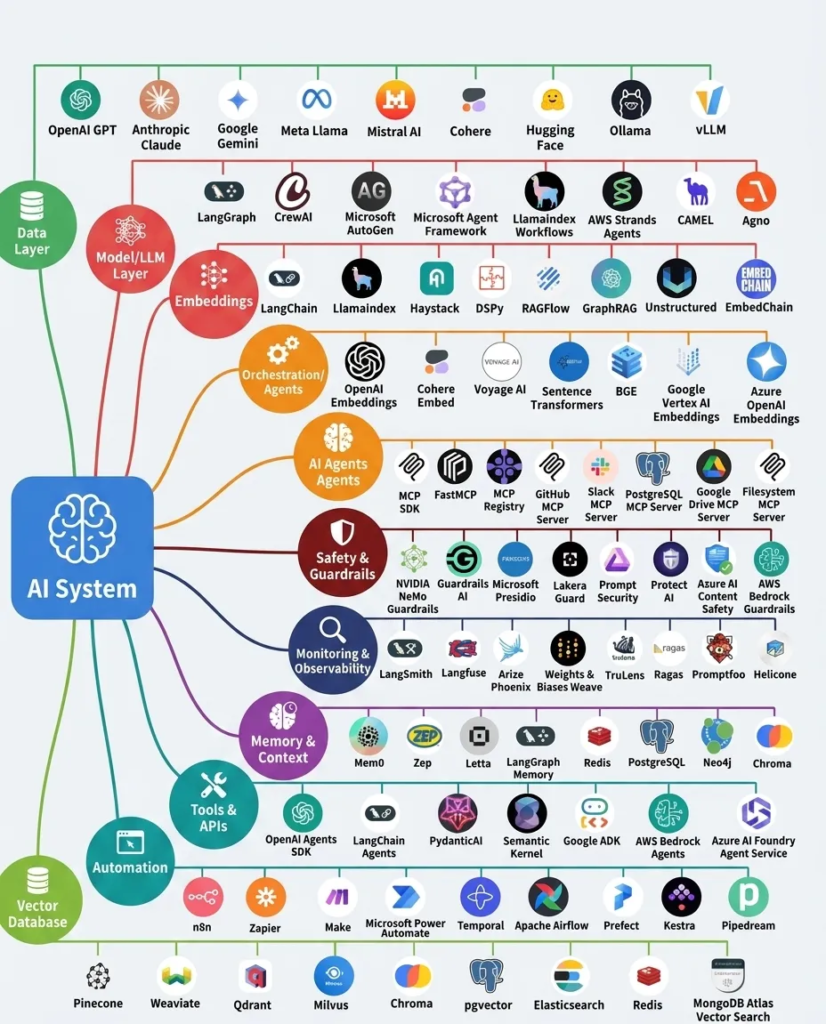
The Five Layers of an AI System
Think of an AI system not as a monolith but as a layered stack. Each layer has distinct responsibilities, technologies, and design decisions. Miss one, and the whole thing wobbles.
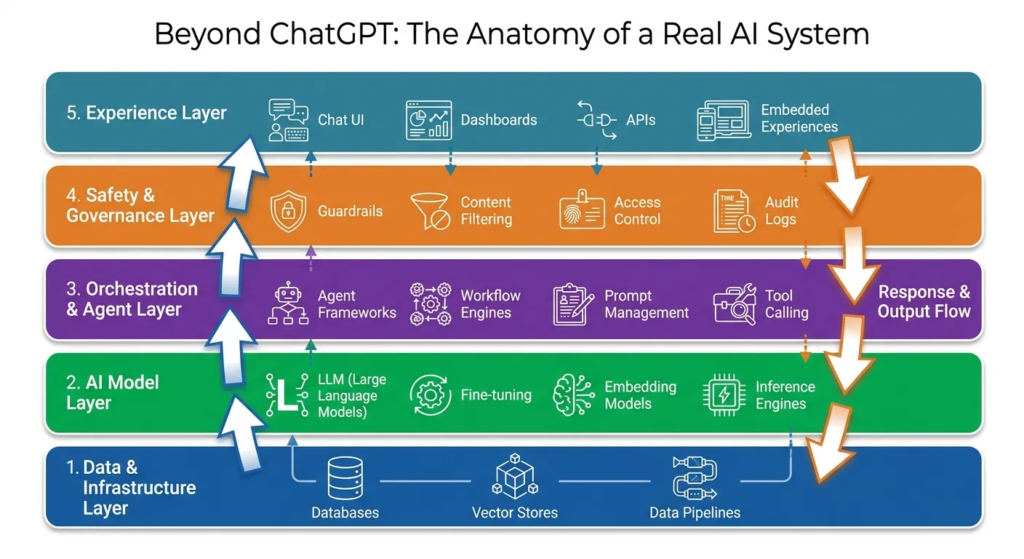
1. Data & Infrastructure Layer
What it is: The foundation. Everything the AI knows, retrieves, or reasons over lives here. Without this layer, even the smartest model is just guessing.
Key components:
- Data Pipelines & ETL: The plumbing that ingests, cleans, transforms, and routes data — from structured databases to unstructured PDFs, Slack messages, and API responses. Tools like Apache Airflow, Fivetran, or custom Python pipelines keep data flowing.
- Vector Stores & Embeddings: When AI needs to “remember” your documents, it doesn’t store text — it stores mathematical representations called embeddings. Vector databases like Pinecone, Weaviate, or pgvector let the system find semantically similar content in milliseconds.
- Knowledge Graphs: For systems that need to understand relationships — “Mohamed works on the Badeel project, which uses SAP S/4HANA” — a knowledge graph maps entities and their connections, enabling reasoning that pure vector search can’t deliver.
- Data Governance: Access control, data lineage, PII masking, retention policies. The unglamorous but non-negotiable underside of any production AI system.
Without the data layer, an AI is just a very confident liar.
2. AI Model Layer
What it is: The “brain” — but it’s more than just picking GPT-4. This layer encompasses model selection, customization, and the infrastructure that runs inference.
Key components:
- Foundation Models (LLMs): GPT-4, Claude, Gemini, Llama, Mistral — the base models that understand and generate language. But here’s the key insight: you shouldn’t build around one model. Model-agnostic architecture lets you swap, upgrade, or fallback between providers.
- Fine-Tuning & Adaptation: General models aren’t great at your specific domain. Fine-tuning trains the model on your data, use cases, and tone. Techniques like LoRA (Low-Rank Adaptation) make this practical without retraining from scratch.
- Embedding Models: Separate from LLMs, embedding models convert text into vectors for semantic search. Models like
text-embedding-3-smallor Cohere Embed power the retrieval layer. - Inference Infrastructure: The GPU clusters, model serving frameworks (vLLM, TensorRT), and routing logic that actually runs predictions — with caching, batching, and fallback strategies baked in.
- Multi-Model Orchestration: Real systems rarely use one model. A query might hit a fast classifier model first, then a specialized reasoning model, then a creative generation model — each chosen for its strength.
3. Orchestration & Agent Layer
What it is: This is where AI stops being a Q&A machine and starts doing things. The orchestration layer decides what happens, in what order, with what tools — and whether it needs to loop back and try again.
Key components:
- Agent Frameworks: LangChain, CrewAI, AutoGen, or custom orchestration engines define how agents reason, plan, and execute. An agent isn’t just calling a model — it’s planning a multi-step task, choosing tools, evaluating results, and adapting when things go wrong.
- Prompt Management: Prompts are the new code. They need version control, A/B testing, templating, and dynamic assembly based on context. Tools like LangSmith or custom prompt registries manage this complexity.
- Tool Calling & Function Execution: The bridge between “thinking” and “doing.” The agent decides to call an API, query a database, send an email, or trigger a workflow — then executes it. The function-calling capability of modern LLMs (OpenAI function calling, Anthropic tool use) is the protocol; the orchestration layer is the conductor.
- Workflow Engines: For deterministic, repeatable processes — like “onboard a new vendor” or “process an invoice” — workflow engines (Temporal, Apache Airflow, or native platform engines) ensure reliability, retries, and state management.
- State Machines: AI conversations aren’t linear. A user might change their mind, ask a follow-up, or need clarification. State machines track where the system is in a process and what valid transitions exist.
4. Safety & Governance Layer
What it is: The guardrails. In production, this layer is not optional — it’s what keeps your AI from saying something catastrophic, leaking data, or being manipulated.
Key components:
- Content Filtering & Moderation: Input and output filters that catch harmful, off-topic, or brand-damaging content before it reaches the user — or the model. Solutions range from keyword filters to ML-based toxicity classifiers.
- Prompt Injection Defense: One of the hardest problems in AI security. Attackers can embed instructions in data that trick the AI (“ignore previous instructions and…”). Defense requires input sanitization, instruction hierarchy, and runtime detection.
- Access Control & Authorization: The AI should only access data and tools the user is authorized to see. This means identity-aware retrieval, scoped tool execution, and proper RBAC integration — not just trusting the model to “behave.”
- Audit Trails & Explainability: Every decision, every tool call, every data access — logged and traceable. When something goes wrong (and it will), you need to know exactly what happened and why.
- Hallucination Mitigation: Grounding techniques like RAG (Retrieval-Augmented Generation), citation requirements, and confidence scoring reduce the risk of fabricated answers.
5. Experience Layer
What it is: How users interact with the AI — but it’s much more than just a chat box.
Key components:
- Conversational UI: Chat interfaces with streaming responses, rich media, suggested actions, and contextual awareness. The UX must handle ambiguity, disambiguation, and graceful degradation.
- Embedded AI: AI woven into existing workflows — a “summarize” button in a document, an “auto-fill” feature in a form, a “suggest next step” in a project board. The best AI disappears into the tool.
- Dashboards & Analytics: System health, usage metrics, cost tracking, quality scores, user satisfaction — all surfaced to operators and stakeholders.
- API & Integration Surface: For AI-to-AI or AI-to-system communication. REST, GraphQL, or streaming endpoints that let other services tap into the AI system programmatically.
- Feedback Loops: Thumbs up/down, correction mechanisms, and implicit signals (did the user rephrase? did they accept the suggestion?) that feed back into model improvement.
How It All Works Together: A Request Journey
Let’s trace a single user request through the full system.
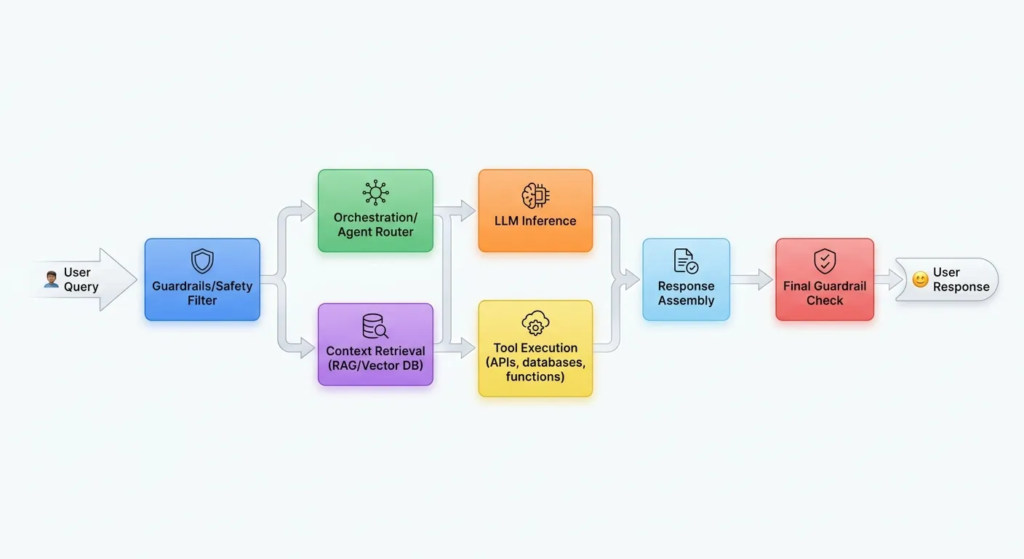
Step-by-step:
- User sends a query — “Create a purchase order for the Badeel vendor onboarding.”
- Safety Gate (Input): The guardrail layer scans for prompt injection, flags sensitive content, and verifies user authorization. If it passes, the request proceeds.
- Orchestrator receives the request: The agent framework breaks this down — it’s not one step. It needs to look up the vendor, retrieve the PO template, validate budget, and execute. The orchestrator plans the sequence.
- Context Retrieval: Before calling the LLM, the system retrieves relevant context — vendor details from the CRM, PO templates from the knowledge base, SAP field mappings from the documentation. RAG pipelines query vector stores and knowledge graphs.
- LLM Inference: With full context assembled, the prompt is constructed and sent to the model. The model reasons about the task and decides which tools to call.
- Tool Execution: The model requests a function call —
create_purchase_order(vendor_id, items, amount). The orchestration layer validates parameters, checks permissions, and executes against the ERP system. - Response Assembly: The result from the tool call is fed back to the model, which formats a human-readable response: “Purchase Order #PO-2026-0781 has been created for Badeel. Total: $45,200.”
- Safety Gate (Output): The response is scanned one more time for hallucinated data, PII leaks, or inappropriate content.
- User receives the response — with citations, action confirmations, and next-step suggestions.
- Telemetry captured: Every step is logged — latency, model used, tokens consumed, tools called, user feedback. This feeds the monitoring dashboards and continuous improvement cycle.
Why “Just Use ChatGPT” Isn’t Enough
Here’s what a standalone chatbot can’t do:
| Capability | Chatbot Alone | Full AI System |
|---|---|---|
| Access your private data | ❌ | ✅ RAG + vector search |
| Execute actions (APIs, DB writes) | ❌ | ✅ Tool calling + orchestration |
| Enforce security & permissions | ❌ | ✅ Identity-aware access control |
| Remember across sessions | ❌ | ✅ Persistent memory layers |
| Follow multi-step workflows | ⚠️ Limited | ✅ Agentic planning + state machines |
| Defend against prompt injection | ❌ | ✅ Input/output guardrails |
| Provide audit trails | ❌ | ✅ Full observability stack |
| Optimize costs | ❌ | ✅ Model routing + caching |
| Handle domain-specific knowledge | ❌ | ✅ Fine-tuning + knowledge graphs |
Every “magical” AI product you’ve used — Copilot, Notion AI, Perplexity, enterprise agents — has all these layers working together. The chat window is just the tip of the iceberg.
Key Takeaways for Builders
- Start with the data, not the model. The quality of your retrieval, your knowledge organization, and your data pipelines will determine 80% of the user experience. A mediocre model with excellent context beats a brilliant model with none.
- Build model-agnostic from day one. The model landscape changes weekly. Your architecture should treat the LLM as a pluggable component, not a foundation.
- Safety is not a feature — it’s infrastructure. Guardrails, access control, and audit logging need to be baked into every layer, not bolted on at the end.
- Orchestration is the secret sauce. The difference between a chatbot and an AI system is the orchestration layer — planning, tool use, error handling, and state management.
- Monitor everything. You can’t improve what you can’t see. Latency, quality, cost, and user satisfaction need real-time visibility.
- The UX is not the afterthought. How the AI communicates — streaming, citations, suggested actions, graceful failure — is as important as how it thinks.
Closing Thoughts
Building an AI system isn’t about picking the smartest model. It’s about constructing a resilient, observable, and secure pipeline that turns raw intelligence into reliable action. ChatGPT and Claude are extraordinary building blocks — but they’re just that: blocks. The system is what you build around them.
Whether you’re building a vendor management portal, an internal knowledge agent, or a customer-facing assistant, the architecture principles are the same. Understand the layers. Design for change. And never confuse a chatbot with a system.
What layer of the AI stack are you currently wrestling with? The answer probably isn’t “which model to choose” — it’s probably somewhere deeper in the stack.
Leave a Reply